
View all case studies

SOFTWARE PROJECTLogistics operations

JMB Global Logistics

Find a route. Review its details. Keep the operation in view.

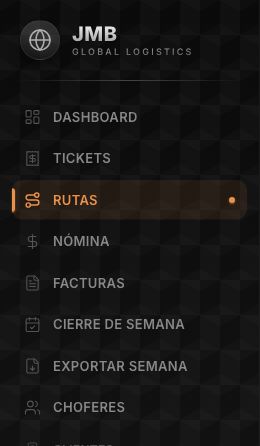
Detail from the original interface. Client records and operational data are excluded from the capture.

01 / About the project

Route search, filters, and details alongside the logistics and administrative areas of JMB Global Logistics.

Client
JMB Global Logistics
Project type
Logistics operations
Development
Olimpo Web

02 / The challenge

The challenge

In logistics, a lookup can start with a specific question: where is the route I need to review? Answering it means finding the relevant record and opening its details. That task has a central place in operational work.

The route also belongs to a broader context. Tickets, drivers, fleet, and administrative work are different parts of the operation. The system needs to organize those areas while keeping the original lookup task clear.

JMB Global Logistics brings both dimensions together: a way to look up routes and navigation organized around logistics and administrative areas. The project connects a specific task with the context in which it takes place.

03 / What we built

What we built

We built a platform with route search, filters, and a detail view. The lookup workflow starts with the list, narrows the search, and leads to information about the selected route.

The navigation brings together routes, tickets, drivers, and fleet. It also organizes payroll, invoice, and weekly closing areas. These are parts of JMB’s logistics and administrative workspace within the system’s structure.

Route lookup provides a concrete example of how the tool is used. Search locates a route, filters narrow the lookup, and the detail view shifts attention from the list to the selected record.

04 / Project scope

Project capabilities

  1. Routes: search, filters, and details

  2. Ticket area

  3. Driver area

  4. Fleet area

  5. Payroll, invoice, and weekly closing areas

What we built

  • Route search and filters: controls for narrowing a lookup and locating the route to review.

  • Route details: a view for moving from the list to the selected route’s information.

  • Logistics and administrative navigation: ticket, driver, fleet, payroll, invoice, and weekly closing areas.

OLIMPO WEB

Let’s talk about your workflow.

Tell us what your team needs, and let’s see how we can help.

Book a meeting